
Overview
The app tells passengers what's happening. It doesn't tell them what to do next.
Traveling is stressful enough without an airport you don't know your way around. Southwest's app hands passengers boarding passes and flight details, but offers little support once a passenger needs to actually move through the space - which leads to checking texts, decoding signage, and digging through menus just to figure out the next step. What passengers get is information - what they don't get is guidance for how to use it, in the sequence they actually need leading up to boarding.
Solution
A walkthrough assistant that turns Southwest's information into a plan a passenger can actually follow.
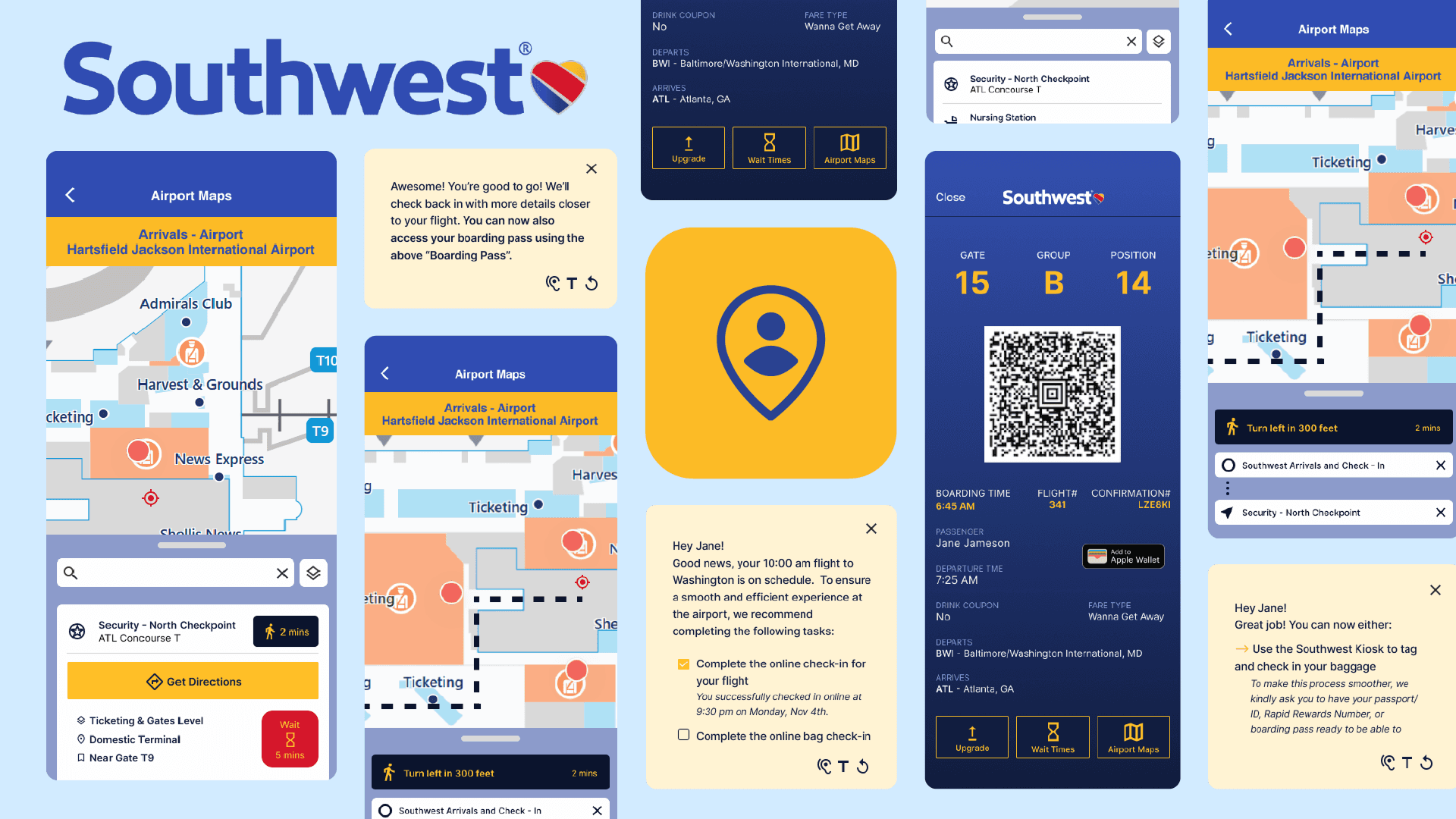
interactive guidance cards
Step-by-step prompts carry passengers through check-in, baggage, and boarding.
personalized flight information
The assistant adjusts its guidance to the passenger's specific flight and where they are in the journey.
airport wayfinding integration
Passengers can preview the airport layout and get directions to security, gates, and other key locations
user-controlled experience
The assistant can be turned on or off - passengers decide when and if they want it.
interested in the process behind this solution? keep scrolling :)
problem discovery
Much of the app's content is built around marketing, promotions, and booking — not around helping passengers complete the tasks in front of them before a flight. Wayfinding content, where it exists, sits behind outdated web pages or buried menus, and flight details that matter in the moment get lost in a hierarchy that doesn't distinguish urgent from incidental.

The information is there.
What's missing is any sense of when a passenger actually needs it.
user research
To better understand the current experience and identify opportunities for improvement, I mapped the content of the current app and the typical pre-flight experience:
content mapping
I analyzed the structure of the existing Southwest Airlines app to understand how well it supports passengers during the pre-flight stage.
This exploration revealed several patterns:
→ The app’s interface prioritizes marketing over task completion
→ Key navigation resources are hidden within hyperlinks to external pages
→ Key flight info is difficult to locate quickly due to limited visual hierarchy
Additionally, when users open their boarding pass, other parts of the app become less accessible - limiting the ability to navigate between key pieces of information.
These findings suggested that users often have to dig for essential information - a frustrating task during time-sensitive travel moments.
journey mapping
Next, I mapped the experience of a typical Southwest passenger during the pre-flight journey:

This helped identify emotional states, user needs, and points of confusion across each stage of the journey - from pre-check-in to boarding. The analysis revealed several key insights:
→ Clear visual hierarchy helps travelers understand what to do next
→ Access to the right information at the right time increases traveler confidence
→ Providing guidance earlier in the journey reduces confusion at the airport
Passengers don’t just need access to information:
They need timely guidance that helps them understand what to do next.
pain points
Information Overload:
Passengers must search through multiple screens and menus to locate the information they need.
Lack of Navigation Support:
The current app provides flight information but offers little support for navigating the airport environment.
Poor Information Hierarchy:
Important flight details are visually minimized, making them difficult to find quickly during time-sensitive moments.
which led me to the Problem Statement:
Design Process
I moved away from isolated screens toward a system that travels with the passenger through the whole pre-flight sequence, built into the existing app rather than bolted on separately. The journey mapping showed confidence eroding gradually across the full sequence, not at any single screen — so the fix needed to live in the sequence too.
insights → Design Decisions
That system took shape as three specific decisions, each answering a different point where passengers lost confidence in the sequence.
Passengers often feel uncertain about what steps to complete before boarding.
→
A virtual assistant provides step-by-step prompts guiding users through the pre-flight process.
Travelers benefit from receiving information earlier in their journey.
→
Users can preview airport maps and important locations before arriving at the airport.
Airport navigation requires clear contextual guidance - in addition to physical signage.
→
The assistant integrates wayfinding maps and gate navigation to help users move through the airport more confidently.
Final Design


